Showing posts with label Freebie. Show all posts

Tuesday, February 19, 2013

Project Life Week 7 and a Freebie

Hello Friends, Hoping that you are having a great start to week with some crafting fun times. I am back with my Project Life Week 7 post and a freebie journaling card for y'all.
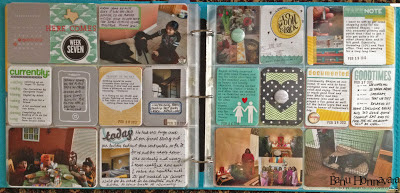

I try to keep a theme of colors going and then all of a sudden it becomes hodge podge. LOL..Oh well. I tried to incorporate mainly Grey and some Blue/Green, but some Yellow and black sneaked in as well :)) This week I used quite a few journaling cards from Studio Calico February Kit (and one from Jan). I also used some Free Journaling cards that I got from AC Digitals. Used some some labels (Martha Stewart and Studio Calico Digi), washi tape (of course) and flair buttons.

Here are some close ups,


Totally in love with Flair buttons and have to be careful not go overboard with them. The black polka dot heart journaling card is a die cut one that I got as part of the PL journaling card swap from SC. Gina sent it to me along with the flair that I have used on that card. I also did some handwritten journaling this time. :)))

I am linking this up with "The Mom Creative blog" and of course I am playing along with Kristin's Currently Challenge as well. You can go to her blog for more details and to play along.

Last but not the least, here is the freebie journaling card for this week. You can see it on my LO this week as well.


  INSTRUCTIONS:
 1. Click the image above to enlarge it
2. Right click the image and save it to your computer
3. Add the image to a new Microsoft Word (or other word processing program) document. (or Photoshop or Photoshop Elements)
4. Print onto card stock or matte presentation paper. Cut along edges and use in your Project Life Layout.

Thanks for  Stopping by,

Tuesday, February 12, 2013

Project Life Week 6 and a Freebie (or 2)

Hello Friends, It is Tuesday. So I am back with another Project Life Post - Week 6. Much simpler layout this time.
I used a bunch of Journaling cards from Studio Calico's January Project Life Kit.


As usual I am playing along with Kristin's Currently challenge. I am taking the Bright Ideas class on SC and I used one of the techniques taught in the class to create my week number card. Loved how it turned out. Also on SC boards, we were talking about some weather related journaling cards, I loved that ideas and ended up creating two for my own use that I want to share with you also.

Some Digital journaling cards from SC Printables and another one of my customized dog journaling card completed the layout. I had seen an SC member use the geo tag chipboard stickers to create a flower, I tried to copy it and as you can see, not that successful. LOL.

I am also linking to "The Mom Creative" blog.

And finally here are my freebies for the week - two weather related journaling cards. You can see them used this week on my LO :) Hope you like them and enjoy them.


 INSTRUCTIONS:
 1. Click the image above to enlarge it
2. Right click the image and save it to your computer
3. Add the image to a new Microsoft Word (or other word processing program) document. (or Photoshop or Photoshop Elements)
4. Print onto card stock or matte presentation paper. Cut along edges and use in your Project Life Layout.

Thanks for stopping by,

Tuesday, February 05, 2013

Project Life Week 5 and Freebie

Hello Friends, It is Project life Tuesday on my blog here. I am a bit late today with my post. Things were just too hectic on home front. Here is my week 5 Layout.


I used a few cards from Studio Calico Block Party PL Kit and also some of the Studio Calico Printables from Bright Ideas Class that is going on right now and plus a few Digital brushes from Studio Calico as well.

I was going to go mostly blue, but somehow I got side tracked and it is a hodge podge of colors. I even used some AC Glitter tape on one of the photos. Lots of Labels and Washi Tape.....LOL...and some shaped arrow from Freckled Fawn.

Here are a few closeups.


I am linking up to the "The Mom Creative" Blog Post and of course I am doing Kristin's Currently Challenge. Love her colored journaling cards.

And finally here is my freebie for this week, a journaling card for the Superbowl that you can see on my LO.

 INSTRUCTIONS:
 1. Click the image above to enlarge it
2. Right click the image and save it to your computer
3. Add the image to a new Microsoft Word (or other word processing program) document. (or Photoshop or Photoshop Elements)
4. Print onto card stock or matte presentation paper. Cut along edges and use in your Project Life Layout.

Thanks for Stopping by.

Tuesday, January 22, 2013

Project Life Week 3 and Freebie

Hi Friends, 2nd post of the day. Please click here or scroll down to see the Seize the Birthday Card Post.

I am here to share my PL Week 3 pages. Going strong so far. But this is only the first month of the year. We have to see what the rest of the year brings. I am linking this to the "The Mom Creative" project life post.

Left Side:

Again, I am playing along with Kristin's Currently Challenge. Loving it so far. I also used a bunch of my own journaling cards on this page. I used a badge that one of the SC Members sent to me in a PL Swap. The I love dogs and the dog image is TAWS Freebie.

Right Side:
I used some Digi Stamps from SC directly on the photos. Loving that. I also created a ghosted journaling block on the Brave Temple Run capture and then journaled on it. Loving this idea. Here is a tutorial on Cathy Z on how to do the same in Photoshop Elements. The Filler card is one of the cards that I got in PL swap on Studio Calico.

Last but not the least, here is a freebie jorunaling card for you. This is the dog silhouette card that I have used on the left side page. I have both Vertical and Horizontal Orientation. Please let me know in comments if you like and use this card.


INSTRUCTIONS:
 1. Click the image above to enlarge it
2. Right click the image and save it to your computer
3. Add the image to a new Microsoft Word (or other word processing program) document. (or Photoshop or Photoshop Elements)
4. Print onto card stock or matte presentation paper. Cut along edges and use in your Project Life Layout.

Thanks for Stopping by.

Wednesday, January 16, 2013

Project Life Week 2 and another Freebie

I am back with my Project life Week 2 layout and another freebie Journaling card for y'all. You can see this journaling card used in my LO. I had so much fun doing the LO for this week.

LEFT SIDE:

 RIGHT SIDE:


I used card from SC PL Kit and also some Ali Edwards Journaling cards for my LO this week. Here is the freebie for you,

I am playing along with Kristin's Currently Weekly challenge . You can see on the Left hand side of my week 2 page that I have my Currently Card. I really like this way of capturing our lives.

And here is the freebie, It is a Journaling card in JPG Format that you can add to a word or a power point document and print it out or use it in Photoshop or Photoshop Elements. I used the Free Chevron pattern Paper from Doodlecraft for my journaling card.


INSTRUCTIONS:
 1. Click the image above to enlarge it
2. Right click the image and save it to your computer
3. Add the image to a new Microsoft Word (or other word processing program) document. (or Photoshop or Photoshop Elements)
4. Print onto card stock or matte presentation paper. Cut along edges and use in your Project Life Layout.


Thanks for Stopping by

Sunday, January 13, 2013

Project Life 2013 - Week 1 and Title

Hello Dear Friends, Hope you had a good weekend. I am doing Project Life again this year. Yup..Still loving this project.  I wanted to share my Title page for the Volume 1 album for this year and week 1 pages. I will also tell you a bit about what worked for me last year and what did not and what I am doing different. And for the first time, I am sharing a freebie with you - a Journaling card that I created for myself and thought y'all might want to use it as well.

Here are my pages,

TITLE PAGE,
 WEEK 1 Left Page
 WEEK 2 Right Page

For my Title page, I have used Freebies from Cathy Z  and Simple Stories.  I have subscribed for the Studio Calico PL Kit, but I had not gotten the kit yet and I wanted to get a jump start on my Title page. I am quite happy how it turned out.

I am playing along with Kristin's Currently Weekly challenge . You can see on the Right hand side of my week 1 page that I have the first of my Currently Cards. I really like this way of capturing our lives. I loved Elise's way of doing quotes and I downloaded her free quotes and am using those this year (love her handwritten word). So for my week Title page - I am using Elise's Quote, Calendar from Melissa's Store and week word art Freebie from September Blue blog.

For the rest of the weeek, I used a combination of Freebie Journaling cards, SeaFoam Digital Edition Journaling cards and few templates of my own.

So, what worked for me in 2012,
1) Keeping it simple wrt to photo selection, sometimes I had many photos, and some times I had one or two, I did not stress out much, Just picked the photos I liked and ran with it,
2) Kept the journaling and embellishments simple and whenever I had some big event, I made it easy on myself and used inserts.

What did not work for me,
1) Journaling - to keep track of it and esp when I was falling behind was hard.
2) Printing photos and waiting to pick them up etc.

What I want to do differently in 2013,
1) I am using OhLife Prompt everyday and it comes in my email at night and I just write a few lines so that it makes my journaling easy.
2) I am playing along with Capture365 - so that I get daily prompts in my email and I can record my every day in interesting ways, angles and work on my photography skills.
3) I am not going to buy the core kit, but just go with SC PL kit, Seafoam Digital edition and use up my stash.
4) I am also doing my week from Monday to Sunday instead of Sunday to Saturday like last year as I feel this will work better to keep the weekend together.

And finally my freebie, It is a Journaling card in JPG Format that you can add to a word or a power point document and print it out or use it in Photoshop or Photoshop Elements. I used the Free Chevron pattern Paper from Doodlecraft for my journaling card.

 INSTRUCTIONS"
1. Click the image above to enlarge it
2. Right click the image and save it to your computer
3. Add the image to a new Microsoft Word (or other word processing program) document. (or Photoshop or Photoshop Elements)
4. Print onto card stock or matte presentation paper. Cut along edges and use in your Project Life Layout.

Sorry for the longish post. Thanks for Stopping by,
Supplies:
Stamp -SC Day by Day Class Stamp set
Paper - PTI White, Epson Matte Presentation paper
Ink - Memento Black